Preferences
Chat Behavior Settings
Auto-Collapse Code Blocks
When enabled, code blocks in chat will be collapsed by default to save screen space. Click the code block to expand and view the full content.
Hide Reasoning Process
For models that support chain-of-thought, enabling this option will hide the model's reasoning process and only show the final result.
Auto-Collapse Reasoning Process
If you don't want to completely hide the reasoning process, you can choose to auto-collapse it. Expand when needed by clicking.
Disable Markdown Rendering
When enabled, messages will be displayed as plain text without Markdown formatting.
Default Model Settings
New Session Model
Choose the AI model to use by default when creating new sessions. You can select from the available model list.
Session Title Generation Model
Choose the model for automatically generating session titles. Usually a fast-responding and cost-effective model is sufficient.
Generate Session Title
Title Generation Timing
Choose when to automatically generate session titles.
Options:
- First Conversation - Generate title immediately after the first round of conversation
- Every Conversation - Regenerate title after each conversation
- Off - Do not automatically generate titles, requires manual trigger
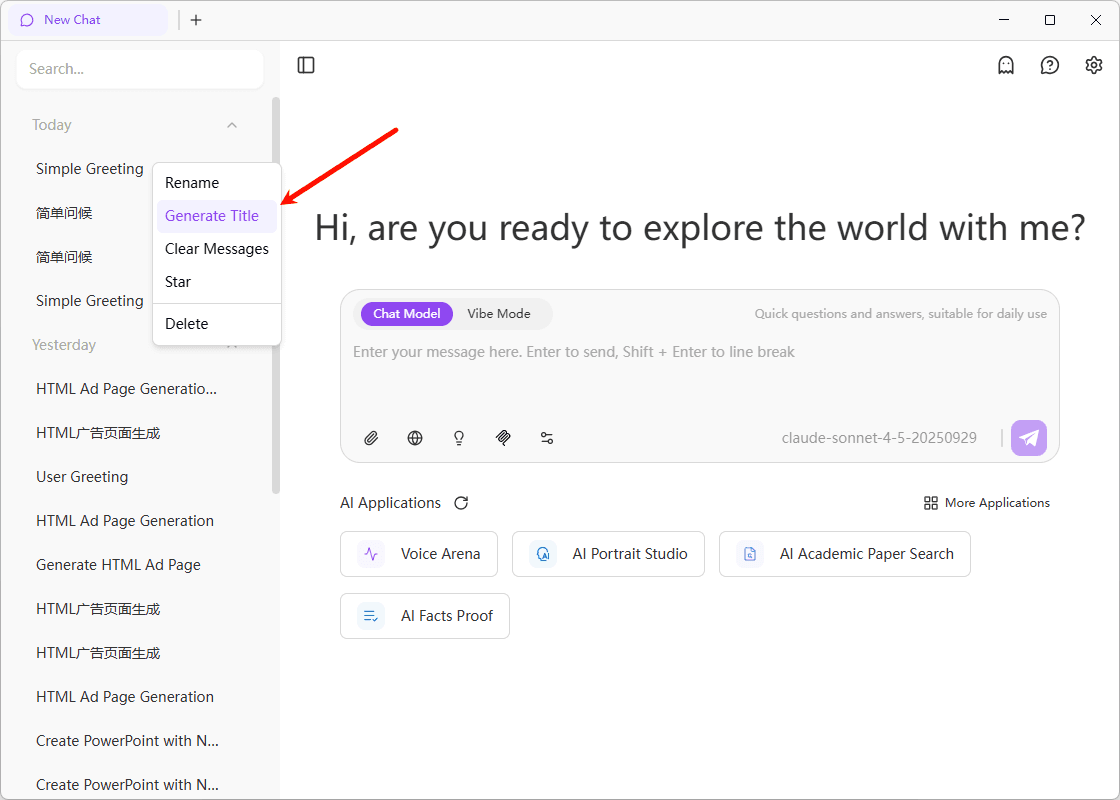
When "Off" is selected, you can manually trigger title generation by right-clicking on a session in the session list in the left sidebar and selecting "Generate Title", as shown below:
302.AI Application Marketplace
Show Application Marketplace on Homepage
When enabled, the application marketplace entrance will be displayed on the homepage for quick access to various AI applications and tools.
The application marketplace offers a rich selection of preset AI applications covering translation, writing, programming, and more. Learn more about the Application Marketplace
Default Search Service
Search Engine Selection
Choose the default search service when using search functionality in chat:
- search1api
- tavily
- exa
- bochaai
Parse Links
Auto-Parse Link Content in Messages
When enabled, when you send a link in a message, the system will automatically fetch the link's content and include it in the context, allowing the AI to respond based on the link content.
Auto-parsing links may increase token usage for requests.
Privacy Mode
Auto-Inherit
When auto-inherit is enabled, creating a new tab will automatically inherit the privacy mode state from the last time.
Suggestion Settings
Enable Conversation Suggestions
When enabled, the system will provide relevant follow-up question suggestions based on current conversation content, helping you better explore topics.
Suggestion Count
Set the number of suggestions to display each time, default is 3. Can be adjusted from 1-5.
Show Only Last AI Reply Suggestions
When enabled, suggestions will only be displayed below the latest AI reply. When disabled, suggestions will be shown below every AI reply.
Stream Output Smoothing
Enable Stream Output Smoothing
When enabled, the text output will be smoother and more natural while the AI is generating a reply, providing a better visual experience.
Use cases:
- Improve reading experience and reduce text flickering
- Make AI reply process more coherent
- Optimize display effect of long text generation