General Settings
Overview
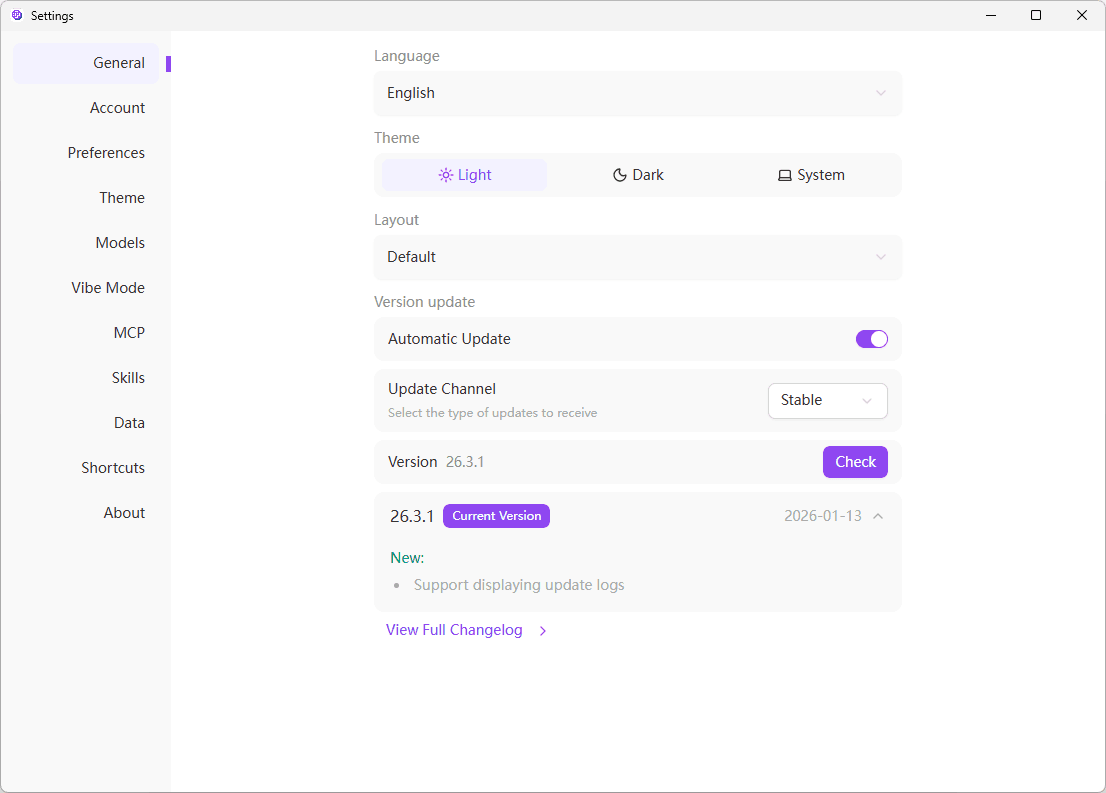
The general settings page provides basic configuration options for the application, including language, theme, layout, and more.
Language Settings
Currently, 302 AI Studio supports the following interface display languages:
- 中文 - Simplified Chinese interface
- English - English interface
Theme Settings
The application offers three theme modes:
- Light - Suitable for bright environments, reduces eye strain
- Dark - Suitable for low-light environments, protects vision
- System - Automatically follows system theme settings
Layout Settings
Layout Options
- Default - Standard layout, suitable for most scenarios
- Wide - Wider display area, suitable for multi-column content
- Ultra Wide - Maximized display area, suitable for large screens
Version Updates
Automatic Updates
When "Automatic Updates" is enabled, the application will automatically check for and download updates in the background.
Update Channel
Choose the channel for receiving updates:
- Beta - Early access to new features, may be less stable
- Stable - Thoroughly tested stable version (recommended)
Version Information
View the current application version number and build information here.
Check for Updates
Click the "Check for Updates" button to manually check for available new versions.
It's recommended to keep the application up to date for the best performance and security.